Vector Art with Organic Flair

Monday, 3:30 pm – 4:30 pm
- patterns and symbols
- AI add-ons you need to know about
- techniques for incorporating scanned images
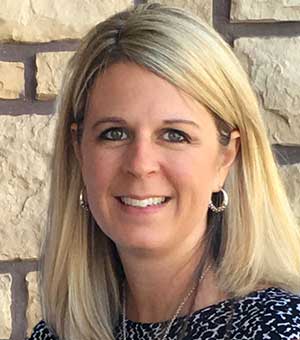
Logos, infographics, and simple vector illustrations are best created in Illustrator, but for some, using the pen tool and creating detailed drawings from scratch is daunting. In this fast paced session, Laurie Ruhlin will lead you through panels, tools and menu commands you may not realize can help you create your next stunning logo or illustration from a few simple shapes.
We’ll explore:
You love working in Photoshop. But are you still performing repetitive tasks? Do you find you have to go through the same processes again and again? Do you keep reaching for menu items that don’t have keyboard shortcuts? Don’t you wish someone could do all the drudge work, while you concentrate on your creativity?
This session will show you how to work faster, how to avoid repetitive operations, and how to spend less time searching for menus and files on your hard drive when you can do it all with a single press of a key.
We’ll cover a load of tips and tricks, including:
A collection of the hottest, juiciest photoshop recipes. Step by step instructions on how to bake up some of the most popular effects on the web and in print today. As you join Colin in the Photoshop kitchen, discover exactly how to reproduce the most requested effects. Along the way, you will be fed a constant stream of tips and time saving tricks. This one will keep you the edge of their seat, and fill your head with exciting new ideas. 1 part, information, 1 part inspiration, with just a dash of fun, is the best way to cook up this session.
Learn the best way to…
This is one session, you won’t want to miss!
Photoshop has the ability to create, import and render 3D objects. If you’ve never explored this side of Photoshop, you’re missing out on a potential game-changer: why search for stock images of objects from exactly the right angle when you can import a 3D model and pose it yourself? And how about creating a model you can get printed in 3D, direct from Photoshop?
If you don’t want to create your own 3D models, see how a revolutionary object library can give you the next best thing, in an instant; and find out how you can render a 3D scene without pain. The session will cover:
Did you know that Photoshop is capable of creating amazing motion graphics? You didn’t read that wrong, in fact Photoshop has a very powerful and largely untaught animation engine.
In this dynamic session, Colin Smith will give you a taste of what’s possible using only the tools in Photoshop CC. You will get a solid foundation of keyframing, so that you can build your own animations and motion graphics that can be used for websites, kiosks, videos and interactive applications.
Learn about motion, keyframing, effects and video within Photoshop:
We use cookies on our websites to give you a great online experience. If you keep browsing, we'll assume you're ok with this, but you can change your settings or opt-out if you wish.
Cookie settingsACCEPT